Best Craft Wood Cutting Machines for DIY Projects
If you’re shopping for a craft wood cutting machine, this guide highlights five reliable options that balance power, precision, and usability for hobbyists, crafters, and small businesses. These machines are suited for different needs—from beginner-friendly desktop models to more capable cutters for detailed custom work. The selections emphasize wood, plywood, and thin composites, with notes on safety, software, and best-use scenarios to help you choose.
Summary at a glance: the five highlighted machines cover a range of power levels and work areas to fit different budgets and project scopes. Use this table to compare core distinctions quickly and identify which model aligns with your craft goals.
| Product | Best For | Key Benefit | Limitations |
|---|---|---|---|
| Twotrees TTS-55 Pro Laser Engraver | Dedicated hobbyists and small makers | High power for deeper cuts and clean engravings | Requires setup for air assist |
| ACMER S2 Laser Engraver | Advanced crafters and educators | True 12W power with high precision | More complex software needs |
| ACMER S1 Laser Engraver (6000mW) | DIYers seeking detailed results | Strong 6W laser with fine spot | Limited area for bigger projects |
| ACMER S1 Laser Engraver (2500mW) | Cost-conscious beginners | Compact desktop design with solid accuracy | Lower power than larger models |
| xTool M2 | All-in-one versatility seekers | Dual cameras and expandable printing/engraving | Add-ons required for full CMYK printing |
Twotrees TTS-55 Pro Laser Engraver
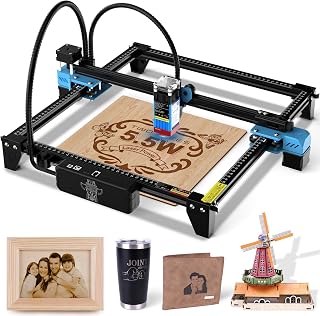
The Twotrees TTS-55 Pro offers a 5.5W laser with air-assisted nozzle support and a metal shield for safety. It features a 300 x 300 mm work area and a 0.08 x 0.46 mm spot for precise engraving and cutting on wood, leather, acrylic, and more. Advanced compression laser technology (LD+FAC+C-Lens) delivers stronger cutting power at a short 23 mm focal length. Best for hobbyists and small-business makers who want deeper cuts and clean detailing on craft wood projects.
Best for: hobbyists who want deeper cuts and reliable engraving on wood panels and thin composites. Choose this if you plan to integrate an air assist system for cleaner cuts. Caution: ensure proper ventilation and safety shields when using higher power in enclosed spaces.
ACMER S1 Laser Engraver (2500mW)

The ACMER S1 model delivers 2.5W of laser power with a compact 130 x 130 mm working area and 0.01 mm repeatable positioning accuracy. It includes Acmerstudio software and supports other popular tools for engraving on wood, bamboo, leather, plastic, and more. This is a strong choice for detailed DIY crafts and small projects where desktop space is limited and budget matters.
Best for: beginners and hobbyists seeking precise detail in a compact footprint. Better for small, intricate designs rather than large panels. Limitation: smaller work area may require multiple passes for larger pieces.
ACMER S2 Laser Engraver (12W)

The S2 model uses a true 12W laser with 0.01 mm positioning accuracy and a 300 x 300 mm working area. It supports ACMER Studio and other software like LightBurn and LaserGRBL, enabling detailed engraving and deeper cutting across wood, metal-coated materials, and more. This is well-suited for serious hobbyists and small studios needing higher-performance capabilities.
Best for: users who require deeper cuts and high-detail engraving across diverse materials. Choose this for more ambitious projects; caution: higher power requires stricter safety practices and ventilation.
ACMER S1 Laser Engraver (6000mW)

This 6W ACMER S1 model targets more intense projects with an approximate 0.04 mm laser spot and a 130 x 130 mm working area. It supports ACMER Studio and compatible software for streamlined design-to-cut workflows. The unit is ideal for highly detailed crafts, personalized gifts, and signs, with better depth than lower-power models in the same class.
Best for: crafters prioritizing finer detail and stronger cutting on small to mid-size pieces. Limitation: limited work area may not suit larger panels without tiling or multiple passes.
xTool M2 Laser Engraver

The xTool M2 integrates dual cameras for real-time workspace previews and supports a modular approach with optional CMYK Inkjet and rotary add-ons. It offers a versatile workflow for wood, leather, felt, fabric, and more, enabling a seamless print-to-cut experience. This is a strong pick for makers who want flexible layout and precision alignment in one cabinet.
Best for: users wanting an all-in-one platform with smart alignment and expansion options. Better for mixed-media work; avoid if you need a large dedicated cutting area without accessories or if you require guaranteed color printing without add-ons.
Buying Guide
What should you look for when choosing a craft wood cutting machine?
- Power vs. material depth: Higher wattage means deeper cuts but may require better ventilation and safety measures.
- Working area: Choose based on typical project size; larger areas enable bigger panels but may come with higher cost and footprint.
- Laser tech and precision: Look for spot size and repeatability to match desired detail level in wood engraving and cutting.
- Software compatibility: Ensure the machine supports your preferred software (ACMER Studio, LightBurn, LaserGRBL, etc.).
- Air assist and safety features: Air assist improves cut quality; safety shields and proper enclosure reduce risk when using higher-power lasers.
- Upgrade path: Consider whether you may want add-ons (rotary, CMYK module) later and whether the base unit supports them.
- Ease of use for beginners: Systems with user-friendly software and clear setup steps shorten the learning curve.
Material compatibility and project planning
Most machines listed here can handle wood, plywood, leather, acrylic, and similar materials. For metals or thicker woods, check exact depth limits and whether multiple passes are needed. Planning projects around material thickness helps maximize accuracy and minimize wear on the laser.
Safety considerations
Always operate in a well-ventilated area and use appropriate eye protection. Verify that the machine includes a safety shield or enclosure when dealing with higher-powered lasers. Follow local regulations for laser use and fire safety practices.
Software and workflow decisions
Software compatibility affects how smoothly you work from design to engraving. If you already use LightBurn or LaserGRBL, confirm compatibility. For beginners, devices bundled with user-friendly software or free studio suites can reduce setup friction.
FAQ
- What material can these craft wood cutting machines handle? Most can engrave and cut wood, plywood, leather, acrylic, paper, and similar materials. Some models support additional materials with specific settings.
- Do I need additional accessories? Some models offer optional air assist, rotary attachments, or CMYK modules. Consider future needs when choosing a base model.
- Is a larger work area always better? A larger area enables bigger projects but increases footprint and price. Choose based on typical project size.
- Which software should I use? Common options include ACMER Studio, LightBurn, and LaserGRBL. Verify compatibility before purchase.
- How important is laser power? Higher power enables deeper cuts and bolder engravings but requires extra safety measures and ventilation.
- Is enclosure necessary? For higher-power machines, an enclosure reduces exposure risk and helps manage fumes. It also helps with consistent cutting temperatures.