Best Data Punch Down Tools for Ethernet and Network Wiring
The best data punch down tool depends on the wiring blocks you need to terminate: a 110-only tool suits many Ethernet keystone jacks and patch panels, while a dual-blade model can also handle 66-style blocks. These five options include adjustable impact tools for home and professional projects, plus a model with a Krone blade. Compare blade types and features before choosing, because they are not interchangeable.
| Tool | Best For | Blade Setup |
|---|---|---|
| Cable Matters 110 | Standard Ethernet terminations | 110 |
| Klein Tools VDV427-300 | 66 and 110 applications | 66/110 |
| Cable Matters 66/110 | Flexible block compatibility | 66/110 |
| VCELINK 66/110 | Cut-and-terminate work | 66/110 |
| TRENDnet TC-PDT | Installations needing Krone | 110/Krone |
Cable Matters 110 Punch Down Tool

This Cable Matters tool is designed to cut and seat network cable into 110 patch panels and keystone jacks. Its adjustable low and high impact settings let users choose between two force levels for different termination needs. The removable 110 blade uses a twist-and-lock attachment intended to keep it secure during use.
Best for: DIY users and installers who primarily work with 110-style Ethernet terminations. It was selected for its focused 110 setup and adjustable impact force. Choose it if you do not need a 66 blade for your projects.
Limitation: The listed package includes a 110 blade, not a 66 blade, so it is not the most flexible choice for 66-style blocks.
Klein Tools VDV427-300 Impact Tool

The Klein Tools VDV427-300 is designed to terminate and cut CAT3, CAT5e, and CAT6/6A cable in one step. It works with 66 and 110 panels and blocks, and includes an impact blade made with metal injection molding. The product listing also specifies adjustable force and includes a pick and spudger for wire-related tasks.
Best for: Network technicians or home installers who work across both 66- and 110-style blocks and value the included pick and spudger. It was selected for its stated cable range, dual-block compatibility, and included accessories.
Limitation: The listed features do not specify blade storage, so check how you plan to carry or store the tool and blade between jobs.
Cable Matters 66/110 Punch Down Tool

This Cable Matters model includes both 110 and 66 blades for terminating cable into compatible IDC blocks, patch panels, and keystone jacks. Its impact force adjusts between low and high settings. The removable blade attaches with a twist-and-lock socket and can be stored inside the tool body for transport.
Best for: Buyers who need one tool for both 110- and 66-style terminations. It was selected because the included blade types cover more block styles than a 110-only tool, and the built-in blade storage helps keep the removable part with the handle.
Limitation: The two blade styles address 66 and 110 terminals; verify the connector’s required termination standard before starting a job.
VCELINK 110 and 66 Impact Tool

VCELINK’s impact punch down tool is built to seat conductors and cut excess wire in the same operation. Its removable double-cutter head is described as interchangeable and reversible between 110 and 66 standards. Low and high impact settings provide two force options, and a hole in the handle stores an extra blade.
Best for: Users seeking a dual-standard tool with a stated cut-and-punch action and a place to store an extra blade. It was selected for its 66/110 flexibility and straightforward feature set.
Limitation: Confirm the blade orientation and terminal standard before use; the listing identifies two standards but does not describe compatibility with other blade types.
TRENDnet 110 and Krone Tool
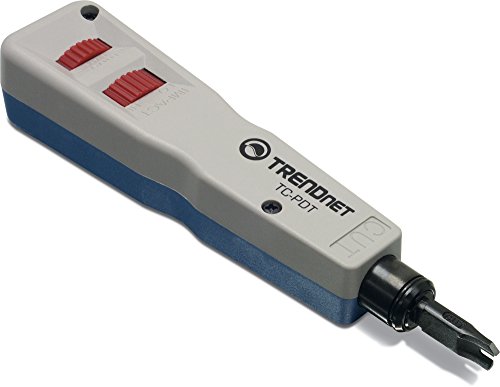
The TRENDnet TC-PDT includes 110 and Krone blades and inserts and cuts terminations in one operation. The listed applications include Cat6A, Cat6, Cat5e, and Cat5 network cables, as well as telephone sockets, faceplates, and patch panels. Its product information also states NDAA and TAA compliance for the United States and Canada and three years of manufacturer protection.
Best for: Installers whose work calls for both 110 and Krone terminations, including certain network and telephone wiring tasks. It was selected because its blade pairing differs from the dual-66/110 tools in this list.
Limitation: It does not list a 66 blade, so choose a different model if 66-style blocks are part of the job.
Buying Guide: How to Choose a Data Punch Down Tool
Which blade standard do you need?
Check the label or documentation for the keystone jack, patch panel, or block before buying. A 110 blade is a common option for Ethernet terminations, while 66 and Krone blades serve other terminal styles. A dual-blade tool can be more useful when a project includes more than one standard, but it does not replace every possible blade type.
Do you need adjustable impact force?
Several tools here offer low and high settings. This lets the user select between two impact levels, rather than relying on a single setting. Follow the connector manufacturer’s termination instructions and use the setting appropriate for the task. Do not assume that every tool has adjustable force; check its listed features.
Is a cut-and-terminate function important?
Many impact punch down tools seat a wire and trim its excess end in one operation when the cutting edge is correctly oriented. This can simplify repeated terminations. If you want to preserve both wire ends or avoid cutting a conductor, check whether the blade has a non-cutting termination side or whether the tool supports a reversible blade.
What features help during storage and maintenance?
Removable blades make it possible to change blade types on supported tools. Blade storage in the handle can reduce the chance of misplacing a spare, while included picks or spudgers can help with conductor removal or adjustments. These features vary by model, so prioritize the accessories that match the work you actually perform.
Frequently Asked Questions
What does a data punch down tool do?
It pushes insulated conductors into insulation displacement connector (IDC) terminals, such as those in compatible patch panels and keystone jacks. Many impact tools also cut off excess wire during the same action.
Can one punch down tool work with 66 and 110 blocks?
Some tools include both 66 and 110 blades. Check the product’s included blade types and confirm they match the terminal block before use.
Are 110 and Krone blades interchangeable?
No. They are distinct blade standards. Choose a tool or blade that matches the wiring block you need to terminate.
Should I choose a high or low impact setting?
Use the setting recommended for the termination and conductor by the tool or connector instructions. Adjustable settings provide options, but the appropriate choice depends on the specific task.
Does every punch down tool cut excess wire?
No. Cutting depends on the blade design and orientation. Check whether the listed blade has a cutting edge and whether it can be reversed for termination without cutting.